
RevHostGPS
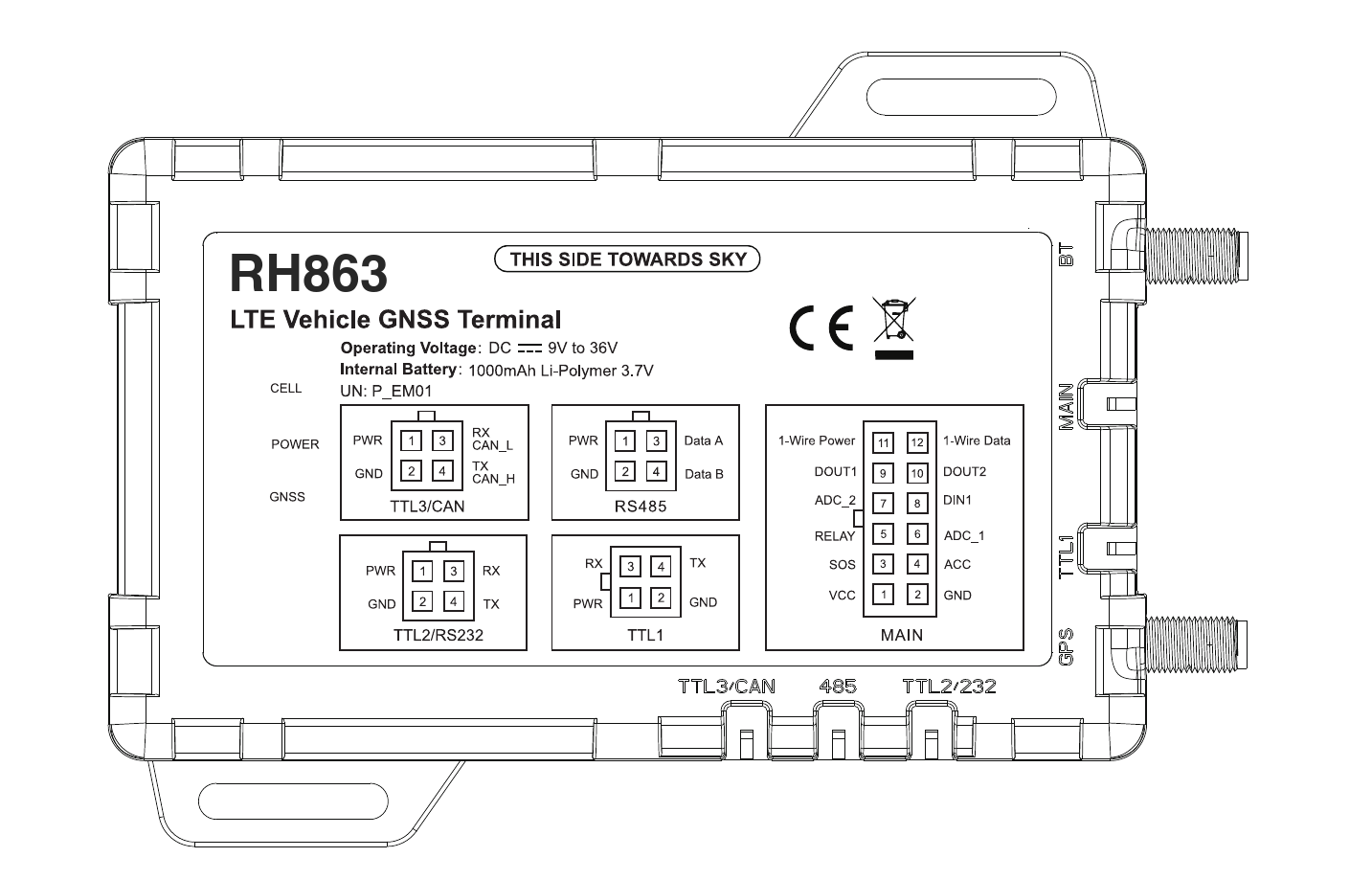
RH863
LTE Vehicle GNSS Terminal
User Manual V1.4
1. Product Overview
The RH863 is a versatile GPS tracker designed to efficiently manage fleets of passenger vehicles, trucks, and refrigerated transport. With 4G connectivity and 2G fallback, it ensures stable global communication and enables fast, accurate vehicle positioning. The RH863 features built-in CAN functionality (supporting J1939 and OBD-II) and 1-Wire communication, and is equipped with multiple TTL (RS232-compatible) and RS485 ports, as well as digital inputs and outputs. These features support demanding applications such as vehicle data acquisition, driver identification and behavior monitoring, fuel level detection, cargo temperature monitoring, and two-way voice communication. The device also provides real-time alerts for harsh acceleration, hard braking, and sharp turns to ensure safer and more efficient fleet management. With a built-in Bluetooth module, it supports various Bluetooth sensors. As an added benefit, the GNSS and Bluetooth antennas can be customized for external mounting, providing greater deployment flexibility.
Position Tracking
- GPS & LBS positioning
- Real-time location query
Anti-Theft & Security
- Ignition detection
- Power/fuel cut-off
- SOS emergency call
- Power supply disconnection alert
- Geo-fence alert
- Towing alert
- Vibration alert
Expandable Peripherals & Sensors
- Vehicle door status detection
- Remote door lock/unlock control
- Turn light/buzzer triggering
- Fuel level monitoring
- Temperature monitoring
- Driver identification
2. Packing List
| Item | Quantity | Unit | Notes |
|---|---|---|---|
| RH863 | 1 | Unit | — |
| Power cable | 1 | Pcs | Cable length: 4.9 ft (1.5 m) |
| SOS button | 1 | Pcs | — |
| Relay | 1 | Pcs | — |
3. Interface Specifications
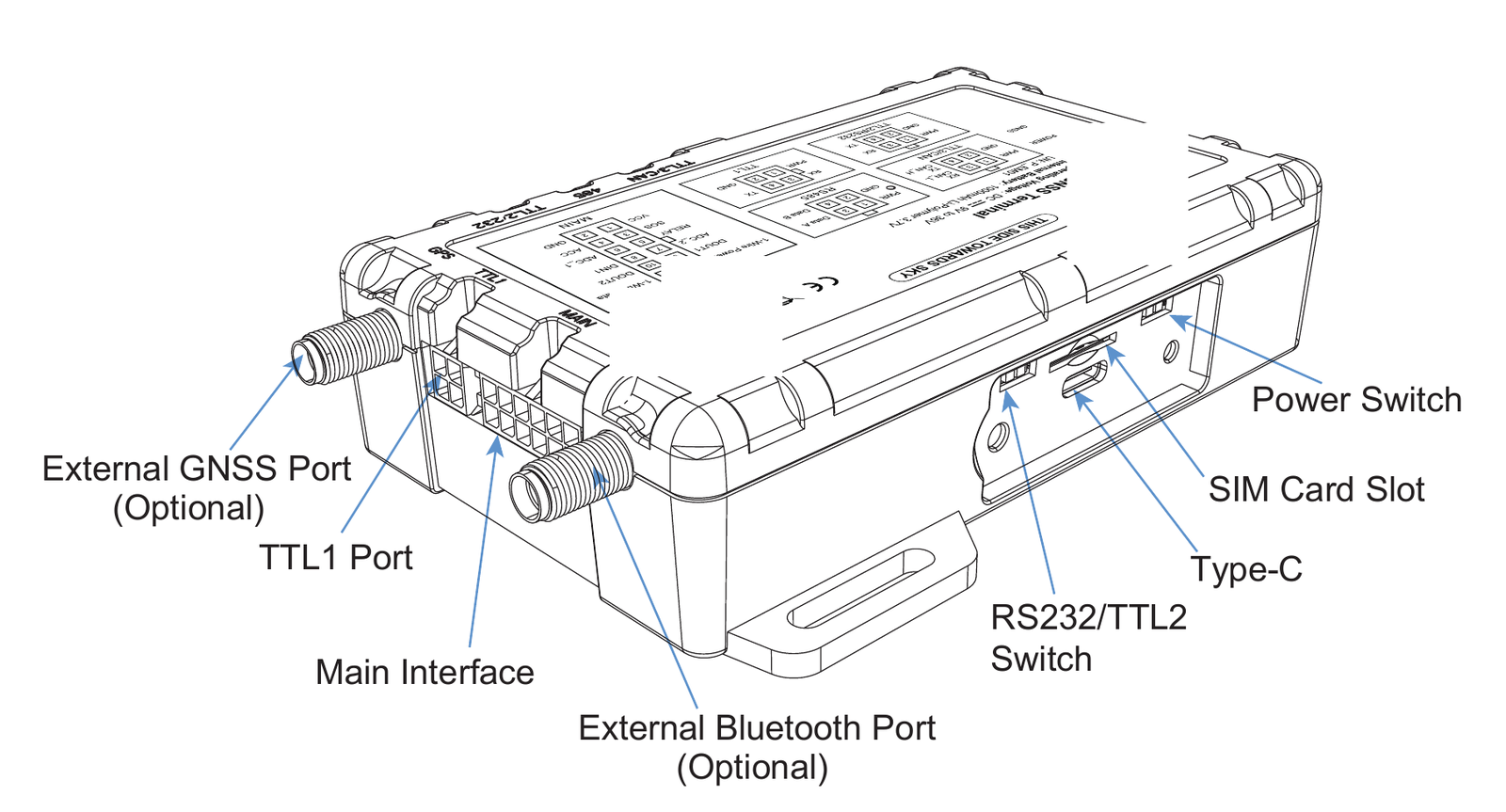
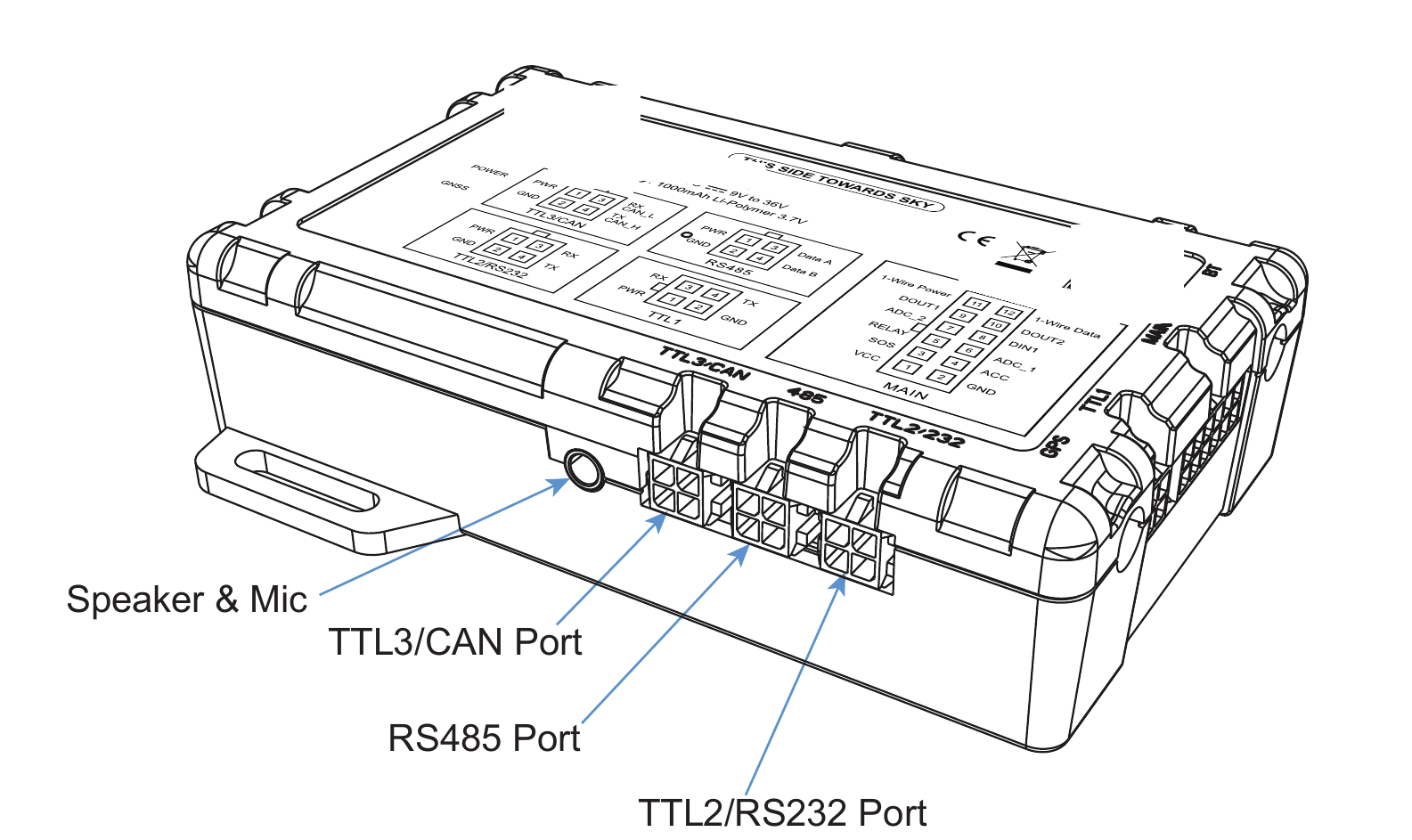
Other Interfaces
| Num | Port | Function Description |
|---|---|---|
| 1 | External GNSS Port | Optional. The internal antenna is used by default. An external antenna is recommended if the GNSS signal may be weak or obstructed. |
| 2 | External BT Port | Optional. The internal antenna is used by default. An external antenna can improve Bluetooth signal strength. |
| 3 | RS232/TTL2 Switch | Switch the port between RS232 and TTL2 functionality. Default: RS232. |
| 4 | Type-C | For firmware updates and debugging. |
| 5 | Power Switch | Turn the device ON or OFF. |
| 6 | Speaker & Mic | For remote listen-in or two-way audio communication. |
4. Interface Definitions
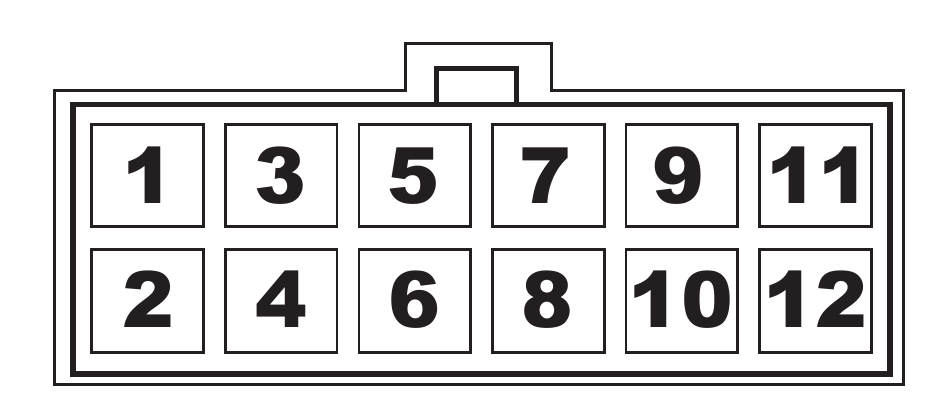
| Pin | Pin Name | Color | Description |
|---|---|---|---|
| 1 | VCC | Red | Main power input (9-36V DC, with voltage detection) |
| 2 | GND | Black | Ground |
| 3 | SOS | Brown | I/O 1, fixed as SOS button input |
| 4 | ACC | Orange | High-level input, fixed as ignition (ACC) detection |
| 5 | Relay | Yellow | Digital output (open-drain) for external relay control |
| 6 | ADC_1 | Purple | Analog input 1 (0-5V detection range, 0.1V resolution) |
| 7 | ADC_2 | Purple | Analog input 2 (0-36V detection range, 0.3V resolution) |
| 8 | DIN 1 | Brown | Configurable digital input (e.g., door status detection) |
| 9 | DOUT 1 | Brown | Configurable digital output 1 (e.g., door lock control). Max load: 500mA. |
| 10 | DOUT 2 | Brown | Configurable digital output 2 (e.g., door lock control). Max load: 500mA. |
| 11 | 1-Wire Power | Blue | 5V power output for 1-Wire peripherals. |
| 12 | 1-Wire Data | Green | Data line for 1-Wire communication |
5. LED Indication
| Red (Power) | Meaning |
|---|---|
| On for 0.3s and off for 0.3s | Low internal battery |
| On for 1s and off for 3s | Fully charged |
| On for 0.1s and off for 3s | Works correctly |
| Solid on | Charging (takes priority over the low-internal-battery pattern) |
| Off | Internal battery insufficient / internal failure |
| Blue (GNSS) | Meaning |
|---|---|
| On for 0.3s and off for 0.3s | In search of GNSS signals |
| Solid on | Position fixed. |
| Off | The GNSS module is in sleep or not working. |
| Green (Cellular) | Meaning |
|---|---|
| On for 0.3s and off for 0.3s | Network initialization |
| On for 1s and off for 3s | Receives network signals normally |
| On for 0.1s and off for 3s | Device online |
| Off | No cellular signals are received. |
| External Battery Status | Meaning |
|---|---|
| The red, green, and blue indicators are on for 3 seconds. | Connect or disconnect the external battery. |
Note
To conserve power and operate discreetly, all three indicators will turn off after a few minutes of normal operation. They can be temporarily reactivated by cycling the external power supply or by sending a remote command.
6. Specifications
| Communication network | 4G Cat.1 & 2G |
|---|---|
| Frequency bands | RH863_LA LTE-FDD: B1/B2/B3/B4/B5/B7/B8/B28 GSM: B2/B3/B5/B8 RH863_EM LTE-FDD: B1/B3/B7/B8/B20/B28 LTE-TDD: B34/B38/B39/B40/B41 GSM: B2/B3/B5/B8 |
| GNSS | GPS + BDS + GLONASS |
| Positioning accuracy | < 8.2 ft (2.5 m) CEP |
| TTFF (open sky) | Avg. hot start: ≤2s · Avg. cold start: ≤38s |
| LED indication | GNSS (Blue), Cellular (Green), Power (Red) |
| Battery | 1000mAh/3.7V industry-grade Li-polymer battery (2000mAh optional) |
| Operating voltage | 9–36VDC |
| Operating temperature | -4 °F to +158 °F (-20 °C to +70 °C) |
| Product weight | 6.1 oz (172 g) |
| Dimensions | 4.5 × 2.7 × 1.1 in (115 × 69 × 28 mm) |
7. Installation
Terminal Check
Visually check that the terminal is in good condition and that all accessories are included.
Ready to Use: Preinstalled SIM Card
Your RH863 comes ready to use. It ships with a preinstalled SIM card and is already provisioned to connect to the RevHostHQ platform, so there is nothing to insert or configure.
Do not remove or replace the SIM card
The terminal works only with the preinstalled SIM card. Removing or replacing it will take the device offline and it won't work. If you believe there is a connectivity issue, contact us through the support page instead.
Installation Recommendation
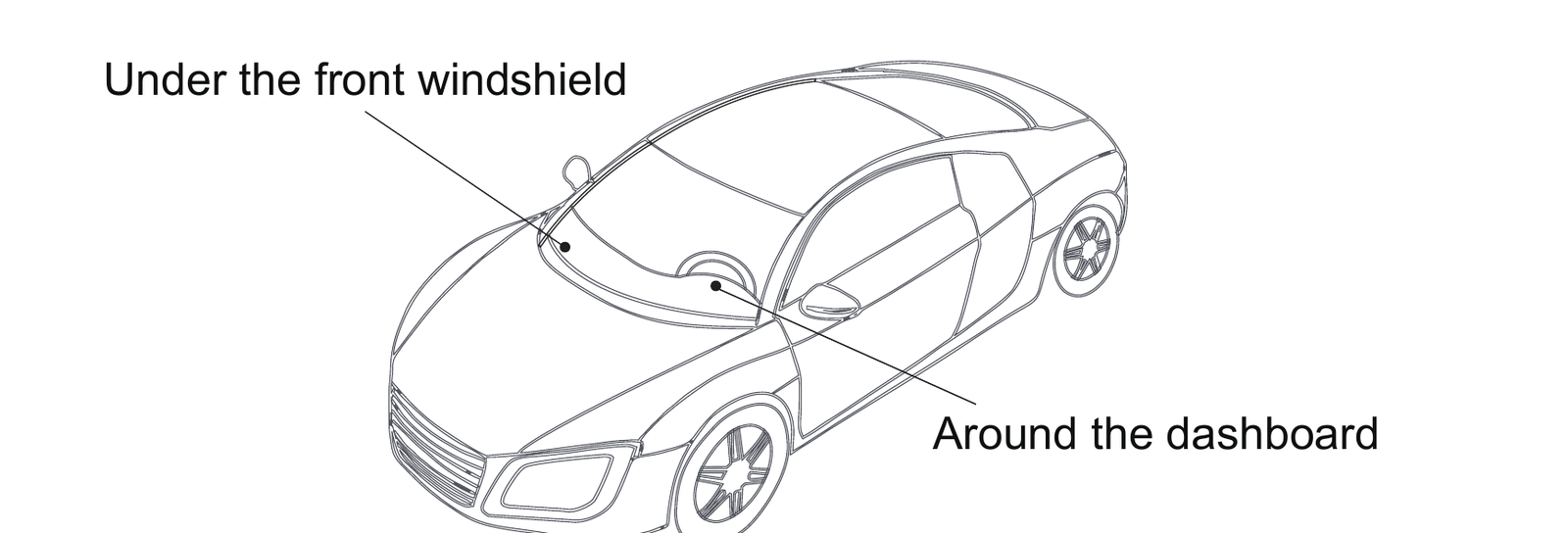
Note
- The device should face up to the sky.
- Metal thermal barriers or heating layers in some windshields may interfere with the GNSS signal.
8. Wiring Diagram
Main Interface
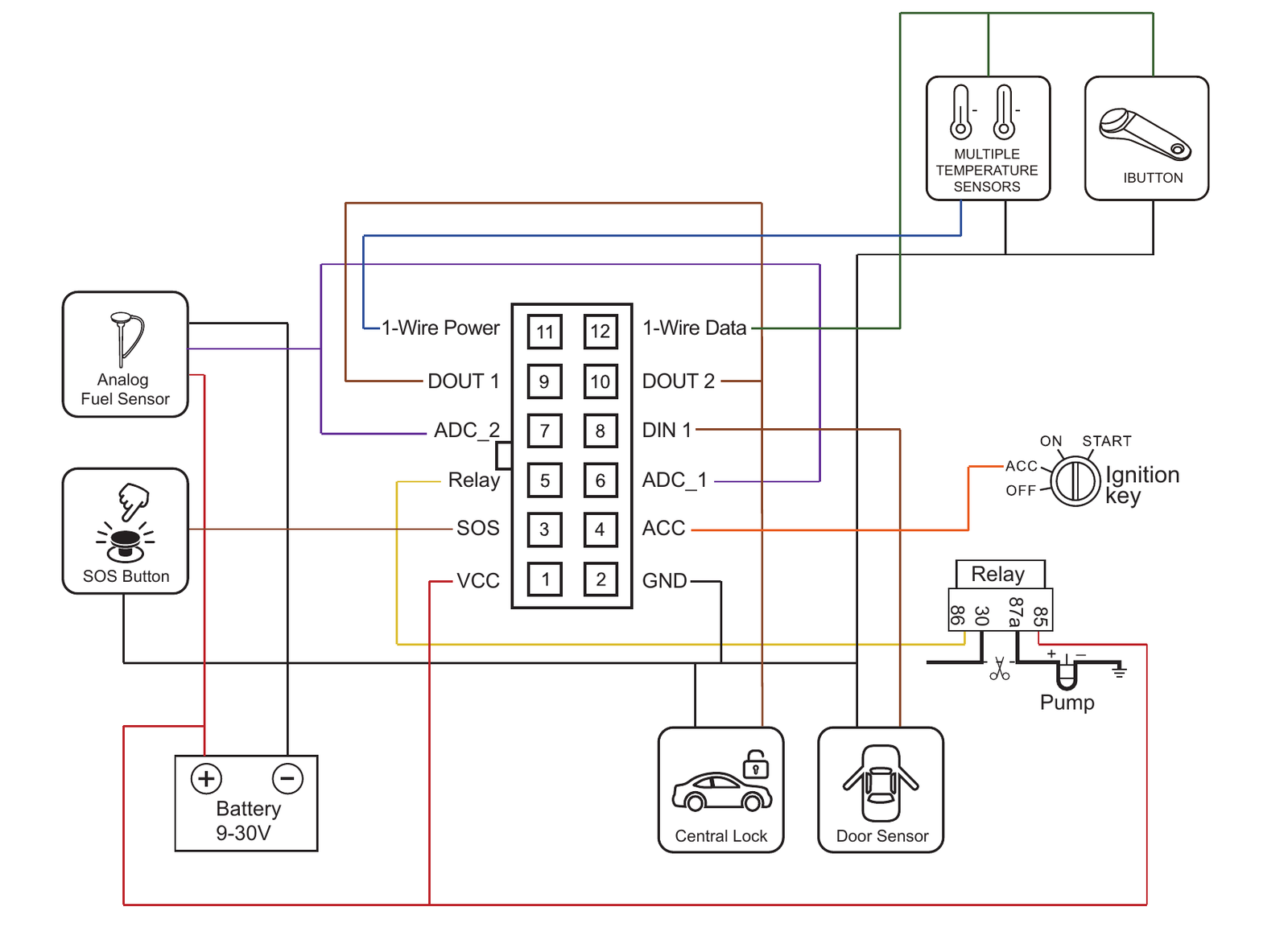
Power connection
The standard operating voltage is 9V to 36VDC. During installation, connect the red wire (VCC) to the vehicle's permanent power source (e.g., battery positive terminal) and the black wire (GND) to the vehicle's chassis ground.
Ignition detection
Connect the orange wire (ACC) to the vehicle's ACC line. This should be a true ignition wire that provides power only when the key is in the ON or START position.
Fuel pump control
Locate the vehicle's fuel pump power line and wire it according to the wiring diagram.
Note
Currently, the magnetic strip card reader is only compatible with the RH863_EM model.
9. Platform Operations
You can configure and control the terminal from your RevHostHQ dashboard. Once the device is installed and online, add it to your fleet and match it to a vehicle. See Set up your RevHostGPS device. Live location, trips, alerts, and remote commands are available on the web dashboard and the RevHostHQ mobile app for iOS and Android.
10. Battery Safety
Please use batteries that are specified by the manufacturer of the terminal. The use of any non-original accessories will void the warranty services. The manufacturer will assume no repair liabilities for damages resulting from the use of non-original accessories.
- Avoid metal objects as they may cause short circuits on battery contacts.
- Do not bend or forcibly open the battery.
- Do not soak the battery in water or expose it to fire.
- It is forbidden to use batteries that are deformed, discolored, spilled, or package-damaged.
- It is forbidden to disassemble or modify the battery.
- Replacement of a battery with an incorrect type can defeat a safeguard (for example, in the case of some lithium battery types).
- Disposal of a battery into fire or a hot oven, or mechanically crushing or cutting a battery, can result in an explosion.
- Leaving a battery in an extremely high temperature environment can result in an explosion or the leakage of flammable liquid or gas.
- A battery subjected to extremely low air pressure may result in an explosion or the leakage of flammable liquid or gas.
11. Troubleshooting
| Type | Method |
|---|---|
| Unable to connect to tracking platform | Check that the device has power and the power switch is set to ON. Check if the vehicle is in a network blind area. If it stays offline, contact support. Do not change the SIM card or device settings. |
| Tracker shows offline | Check whether external power is still connected. Check if the vehicle entered a network blind area. If it stays offline, contact support. |
| Unable to locate | Make sure the top side is facing upward without metallic shielding. Make sure it's not in an area with no satellite coverage. |
| Location drift | In areas with poor GNSS signal (tall buildings around, or a basement), drifting may happen. Check whether vibration happens around to trigger the accelerometer. |
| Remote command has no effect | The vehicle may be in a network blind area. Retry once it is back in coverage. If commands from the RevHostHQ dashboard keep failing, contact support. |
Note
If the issue persists, contact us through the support page with your device IMEI and a description of the problem.
12. Warranty Instructions
- The warranty is valid only when the warranty record is properly completed, and upon presentation of the proof of purchase consisting of the original invoice indicating the date of purchase, model, and serial number of the product. We reserve the right to refuse warranty if this information has been removed or changed after the original purchase of the product.
- Our obligations are limited to repair of the defect or replacement of the defective part, or at our discretion replacement of the product itself.
- Warranty repairs must be carried out by an authorized service centre. The warranty will be void if a repair has been attempted by any unauthorized service centre.
- Repair or replacement under the terms of this warranty does not provide the right to extension or renewal of the warranty period.
- The warranty is not applicable to cases other than defects in material, design, or workmanship.
Note
To start a warranty claim or request service, contact us through the support page with your device IMEI, purchase date, and a description of the problem.