
RevHostGPS
RH502
LTE OBD-II GNSS Tracker
User Manual V1.0
1. Overview
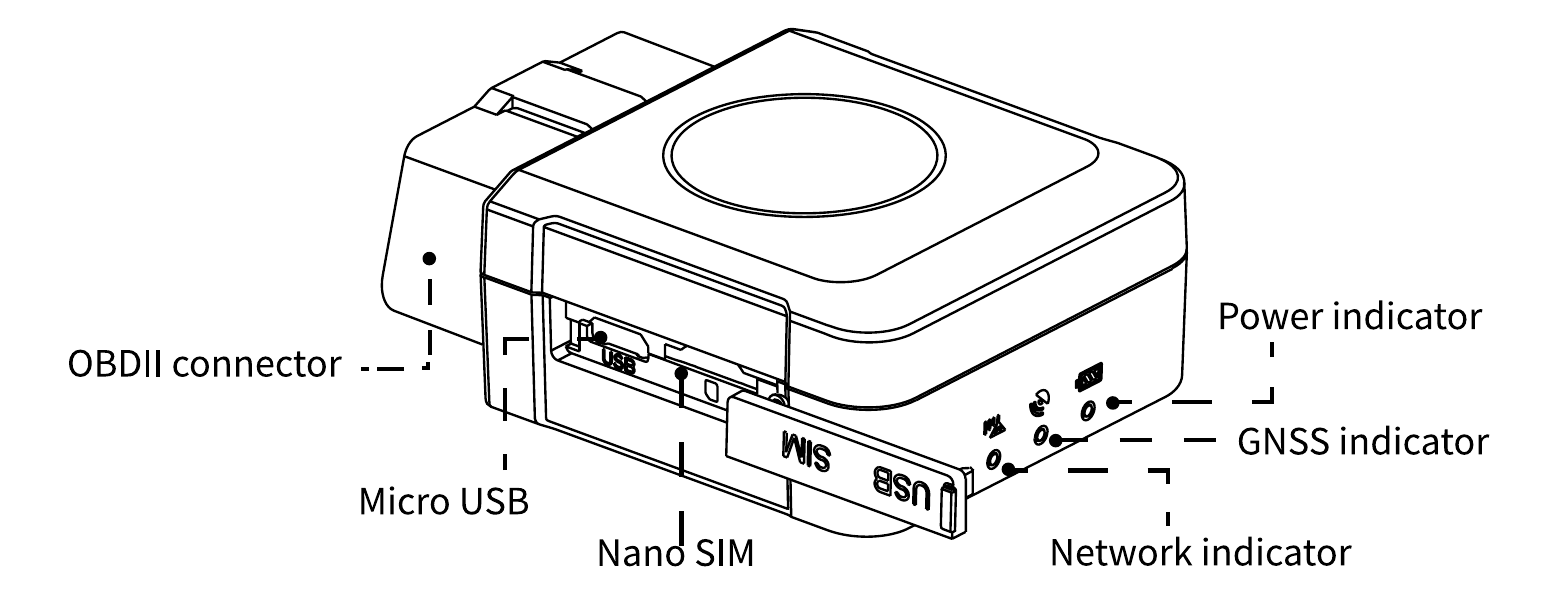
1.1 Appearance
1.2 Pinout
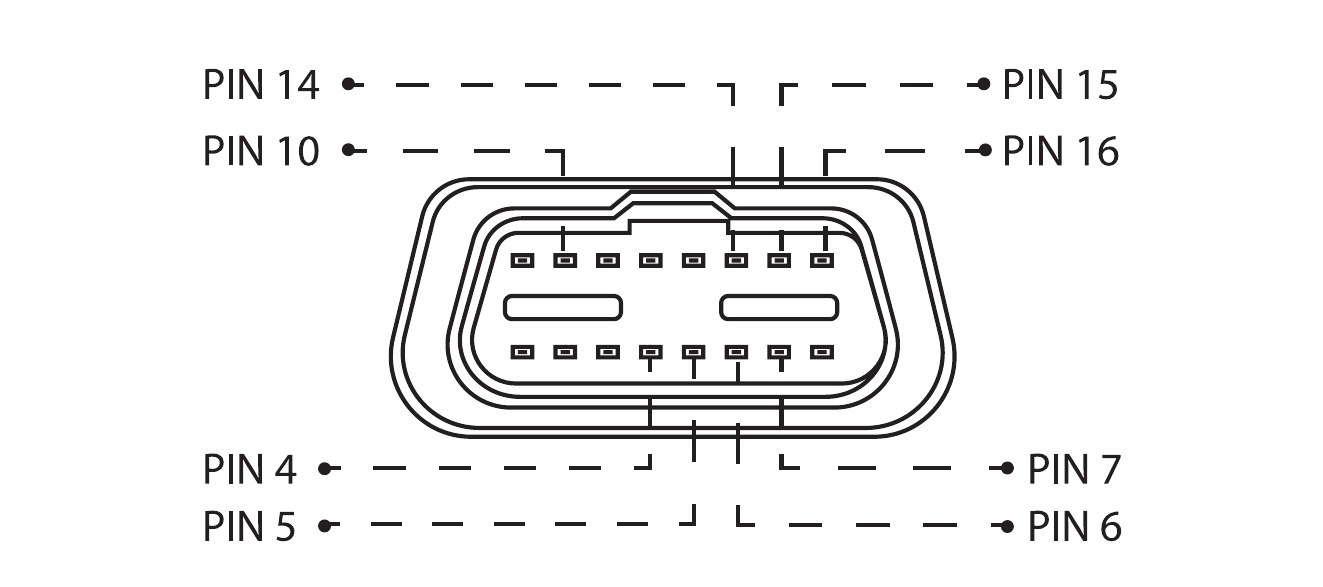
| Pin Number | Pin Name | Description |
|---|---|---|
| 4 | GND(-) | Ground |
| 5 | GND(-) | Ground |
| 6 | CAN_H | CAN high |
| 7 | K-Line | — |
| 14 | CAN_L | CAN low |
| 15 | L-Line | — |
| 16 | VCC (9-36V DC+) | Power supply (9–36 V DC) |
1.3 Status LED Indication
| Power Indicator (Red) | Meaning |
|---|---|
| Fast blink (0.1s–0.1s on/off) | The battery is low. |
| Slow blink (2s–2s on/off) | The device is charging. |
| Solid on | The charging is complete. |
| Slow blink (0.1s–2s on/off) | The device operates correctly. |
| Off | The battery is under voltage or encounters an internal failure. |
| GNSS Indicator (Blue) | Meaning |
|---|---|
| Fast blink (0.3s–0.3s on/off) | The device is searching for satellite signals. |
| Solid on | The GNSS module has already fixed a position. |
| Off | The device is in sleep mode or not operating. |
| Network Indicator (Green) | Meaning |
|---|---|
| Fast blink (0.3s–0.3s on/off) | The cellular modem is initializing. |
| Slow blink (0.1s–2s on/off) | The cellular network works correctly. |
| Solid on | The device is in a call/online. |
| Off | Network error. |
2. Installation
2.1 Ready to Use: Preinstalled SIM Card
Your RH502 comes ready to use. It ships with a preinstalled SIM card and is already provisioned to connect to the RevHostHQ platform, so there is nothing to insert or configure.
Do not remove or replace the SIM card
The device works only with the preinstalled SIM card. Removing or replacing it will take the device offline and it won't work. If you believe there is a connectivity issue, contact us through the support page instead.
2.2 Installing the Device
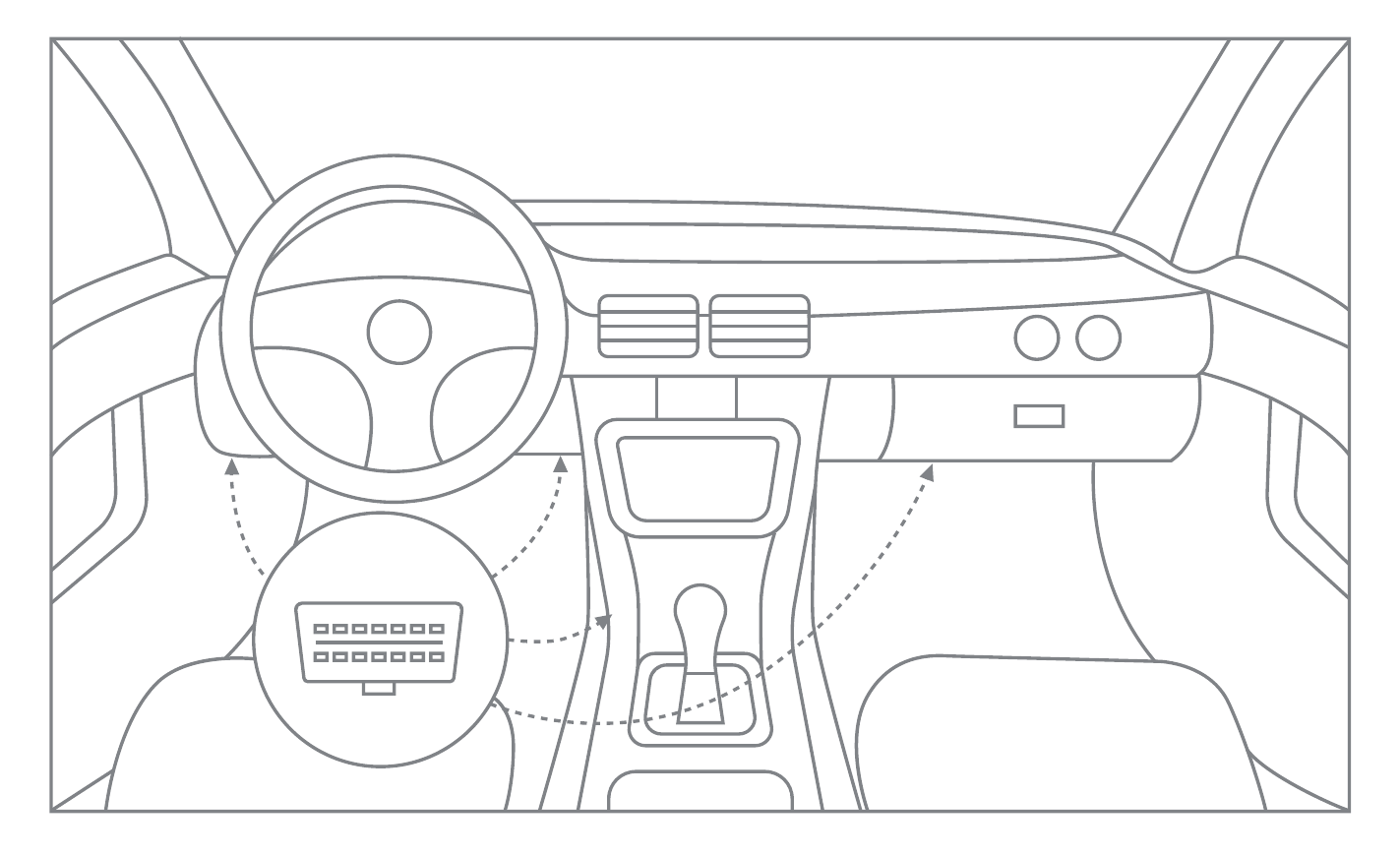
Connect the device to the vehicle: find the OBD-II connector in your vehicle. The figure below shows the most common OBD-II connector locations.
Note
Once the device is plugged in and online, finish activation in RevHostHQ. See Set up your RevHostGPS device.
3. Default Settings
The RH502 ships fully configured for the RevHostHQ platform. No APN, server, or SMS configuration is needed. Plug it in and it reports automatically. The default behavior is described below.
Movement and ignition detection:
- Vehicle movement will be detected by the accelerometer.
- Ignition will be detected by vehicle power voltage (between 9–36 V).
The device sends an alert notification to RevHostHQ if any of these events happen:
- The vehicle keeps moving at speeds above the threshold for a preset duration.
- The driver steps on the brake or gas pedal hard, or corners rapidly.
- The device is plugged or unplugged from the OBD-II connector.
4. Features & Specifications
4.1 Features
- Communication via 4G LTE networks. Two complementary positioning systems ensure locations are accurately displayed in RevHostHQ.
- Obtains real vehicle data (accurate mileage, fault code, ACC status, fuel consumption statistics, battery voltage, engine speed, etc.).
- Get instant alerts for 4 kinds of dangerous driving behavior, depending on your needs.
- Instant alerts for atypical events such as car fault, collision, overspeed, device pull-out, engine idling, low battery, geo-fence entry/exit, etc.
- Through Bluetooth connection you can configure parameters, upgrade software, and debug.
- Ensures constant tracking in areas with poor GPS signal, or even without it.
- Simply plug this device into the OBD-II socket. You don't have to turn to professionals.
4.2 Basic Characteristics
GNSS
| Positioning system | GPS/BDS |
|---|---|
| Frequency | L1 |
| Positioning accuracy | <8.2 ft (2.5 m) CEP |
| Track sensitivity | -162 dBm |
| Acquisition sensitivity | -148 dBm (cold) / -156 dBm (hot) |
| TTFF (open sky) | Avg. hot start <1s · Avg. cold start ≤ 32s |
Cellular
| Communication network | LTE Cat M1&NB |
|---|---|
| Frequency | Cat M1: B2/B4/B5/B12/B13 · Cat NB2: B2/B4/B5/B12/B13 |
Power
| Battery | 160mAh/3.7V |
|---|---|
| Input voltage | 9-36VDC |
OBD Interface
| Data | K-Line, CAN Bus Data |
|---|---|
| Data reading | Allow information to be read from OBD-II port (supports OBD protocols): ISO 9141-2 (5 baud init, 10.4 kbaud) ISO 14230-4 KWP (5 baud init, 10.4 kbaud) ISO 14230-4 KWP (fast init, 10.4 kbaud) ISO 15765-4 CAN (11 bit ID, 250 kbaud) ISO 15765-4 CAN (11 bit ID, 500 kbaud) ISO 15765-4 CAN (29 bit ID, 250 kbaud) ISO 15765-4 CAN (29 bit ID, 500 kbaud) SAE J1939 CAN (29 bit ID, 250 kbaud) SAE J1939 CAN (29 bit ID, 500 kbaud) |
Interface
| Connection | OBD II socket |
|---|---|
| GNSS antenna | Internal High Gain |
| GSM antenna | Internal High Gain |
| USB | 2.0 Micro-USB |
| LED indication | 3 status LED lights |
| SIM | Nano-SIM |
| Data storage | 4+4MB |
Physical Specification
| Dimensions | 2.6(L) × 2.0(W) × 1.0(H) in (65 × 50 × 25 mm) |
|---|---|
| Weight | 2.3 oz (65 g) |
Operating Environment
| Operating temperature | -4 °F to 158 °F (-20 °C to 70 °C) |
|---|---|
| Operating humidity | 5%–95%, non-condensing |
Feature
| Sensors | Accelerometer |
|---|---|
| BLE | Support BLE 4.0 protocol |
| Ignition detection | External power voltage, accelerometer, engine RPM |
| Scenarios | Vehicle movement alert, overspeed alert, geo-fence, vehicle battery detection, power supply disconnection |
| Driving behavior analysis | Harsh acceleration, harsh braking, harsh cornering, collision |
| Fuel monitoring | OBD II |
5. Precautions About Battery
Please use batteries that are specified by the manufacturer of the device. The manufacturer will assume no repair liabilities for damages resulting from the use of non-original accessories.
- Avoid metal objects as they may cause short circuits on battery contacts.
- Do not bend or forcibly open the battery.
- Do not soak the battery in water or expose it to fire.
- It is forbidden to use batteries that are deformed, discolored, spilled, or package-damaged.
- It is forbidden to disassemble or modify the battery.
6. Warranty Instructions & Service
6.1 Special Note
- No prior notice will be given if the product is upgraded due to technological reasons.
- The appearance or color of the product is subject to the actual device.
- The warranty applies to the services of repair, replacement, and refund of the product with the following IMEI.
- Please keep your proof of purchase in a safe place, as it will be needed at the time of service.
6.2 Warranty Terms
For damages not caused by human factors, this warranty lasts for one year starting from the date of purchase. You can choose to pay for the repair services in any of the following cases:
- The warranty period expires;
- No warranty record or valid proof of purchase;
- The product, including its accessories, is not in the warranty period;
- Quality issues resulted from unauthorized repair, crash, liquid spillage, accident, modification, or incorrect voltage input; or the IMEI or counterfeit mark of the device is broken or scribbled;
- Damage caused by installing or using the device without following the instructions in this user manual;
- The warranty does not cover damage resulting from soaking in liquid;
- The product model is inconsistent with the warranty record;
- Damage caused by force majeure such as fire, flood, or lightning.
6.3 Note
For vehicle trackers, the warranty lasts for 1 (one) year from the date of purchase. The specific terms are:
- A full replacement, including accessories, if the product is found defective during the unpacking check (that is, the device has neither been installed nor used);
- If a defect occurs within one year after installation: replace only the mainboard if the housing is intact and doesn't affect normal use; or replace the housing and the mainboard if the housing is defective and affects normal use (man-made damage voids the replacement service for the housing);
- Free repair services will be given to the product if a defect is found during the first year under proper use.
Note
To start a warranty claim or request service, contact us through the support page with your device IMEI, purchase date, and a description of the problem.
7. Troubleshooting
When an issue arises with the device, you can troubleshoot it using the table below. If the issue persists, contact us through the support page.
| Common Issues | Possible Causes | Solutions |
|---|---|---|
| Poor signal | The device is used in an area where radio waves cannot reach, such as near high-rise buildings or in a basement. | Try it in a place where satellite signals can be well received. |
| Power-on failure | The battery is exhausted. | Plug the device into the vehicle's OBD-II port to charge it. |
| Failed to access the network | The device is out of cellular service area. | Try it in an area with cellular service. |
| Failed to access the network | The signal is extremely weak. | Try it in an area with strong signals. |
| Failed to access the network | There may be an issue with the preinstalled SIM card. | Do not remove or replace the SIM. Contact us through the support page. |
| Failed to query a location | The device keeps replying "No data found, please try again". | Contact us through the support page. |